Product update · July 2026
Borrowers in any language, campaign reruns in minutes, and scripts you can retire safely
Here is what we shipped in Convershake in July. Three improvements your team will feel first — AI voice agents that handle borrowers answering in another language, campaign reruns with same-day redial control, and a safe way to retire outdated call scripts (the conversations your agents follow) — plus everything else, including call analysis in 14 more languages.

Vitālijs Silins-Ozerson LinkedIn
CTO & co-founder · 31 July 2026
major
Serve borrowers who answer in another language
Tell your AI agent which other language to expect on calls — and what to do when a borrower can only speak it: keep going, end the call politely in their language, or hand the call to your team.
Some borrowers pick up and can only continue in another language. Before doing anything, the agent double-checks in the call's own language — “can you continue in Latvian?” — so someone who merely dropped one foreign word keeps their normal call.
- The agent asks first whether the borrower can continue. A yes simply resumes the call.
- It understands the answer in either language — a short «да» or «нет» is enough.
- The call transcript shows both languages side by side, so you read one conversation, not two halves.
- The check-in question comes ready-written in 18 languages — edit it if you like.
What shipped
- Expected-language and outcome settings per call script
- Confirmation wording built in for 18 languages
- A second listener locked to the expected language
- Transcripts paired turn by turn
major
Run the next calling wave in minutes
Duplicate any campaign for a new audience — every setting is copied except the contact list — and keep redials inside the calling day with the new same-day-only setting.
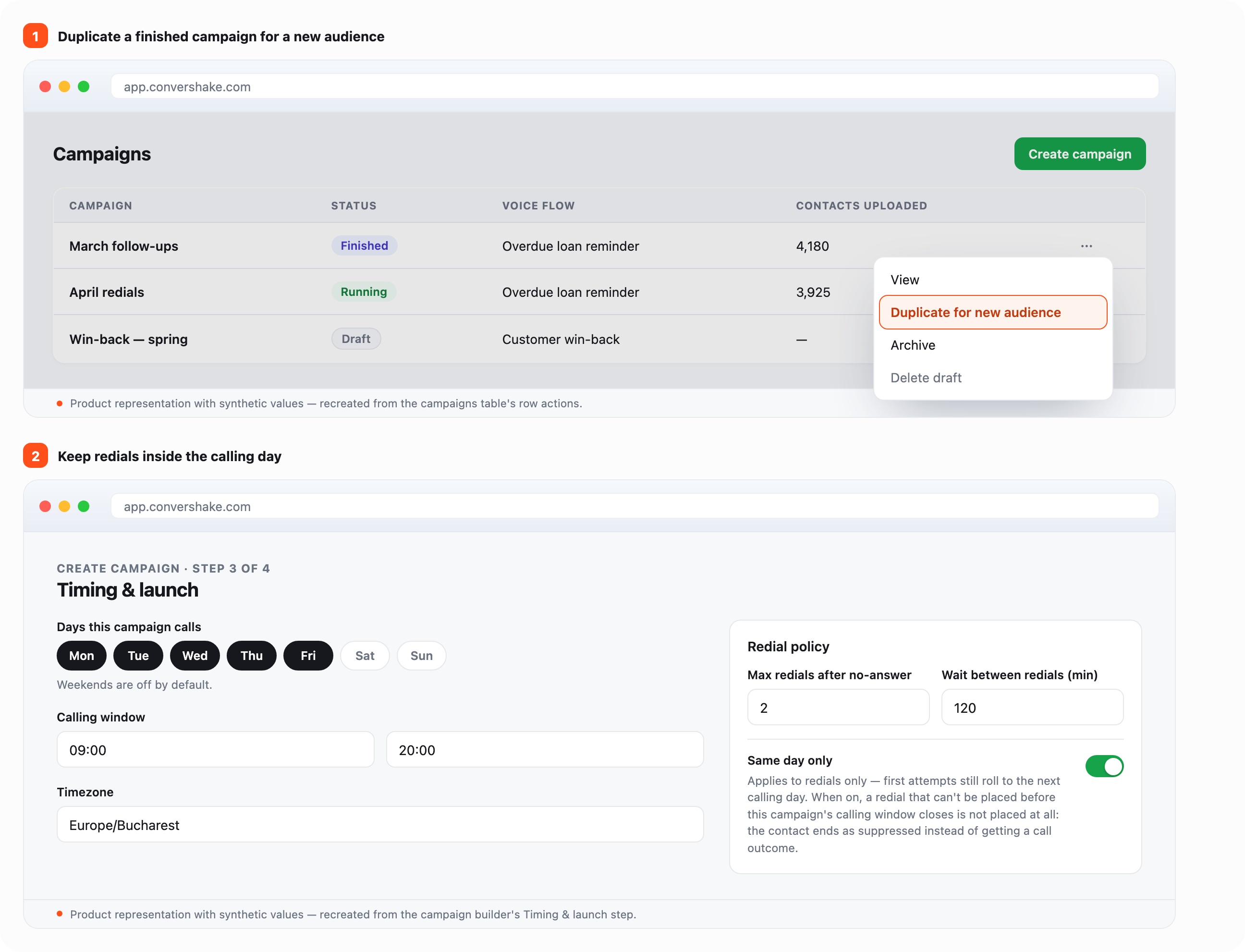
A calling wave that worked is usually the template for the next one: same script, same schedule, new list. And with same-day-only on, a redial that can't happen before the day's calling window closes is skipped rather than carried to the next morning — first-time calls still carry over, so a campaign launched late in the day doesn't lose anyone.
- Duplicate works from any campaign — running, finished, or archived — and copies everything except the contact list.
- Pause, resume, stop, or archive several campaigns at once; each button shows how many of your selection it applies to.
- Sort the campaign list by status or by contacts uploaded to see what needs attention first.
- Set how long to wait between redials and how many to allow, per campaign — the same limits whether you use the dashboard or the API.
What shipped
- Duplicate-for-new-audience action on every campaign row
- Same-day-only redial setting across dashboard and campaign API
- Bulk pause / resume / stop / archive with eligible counts
- Status and contacts-uploaded sorting on the campaign list
major
Retire call scripts without deleting them
Take off air retires a call script in one step: it stops taking calls immediately and can no longer be chosen for new campaigns. Archive puts it away entirely. Both can be undone at any time.
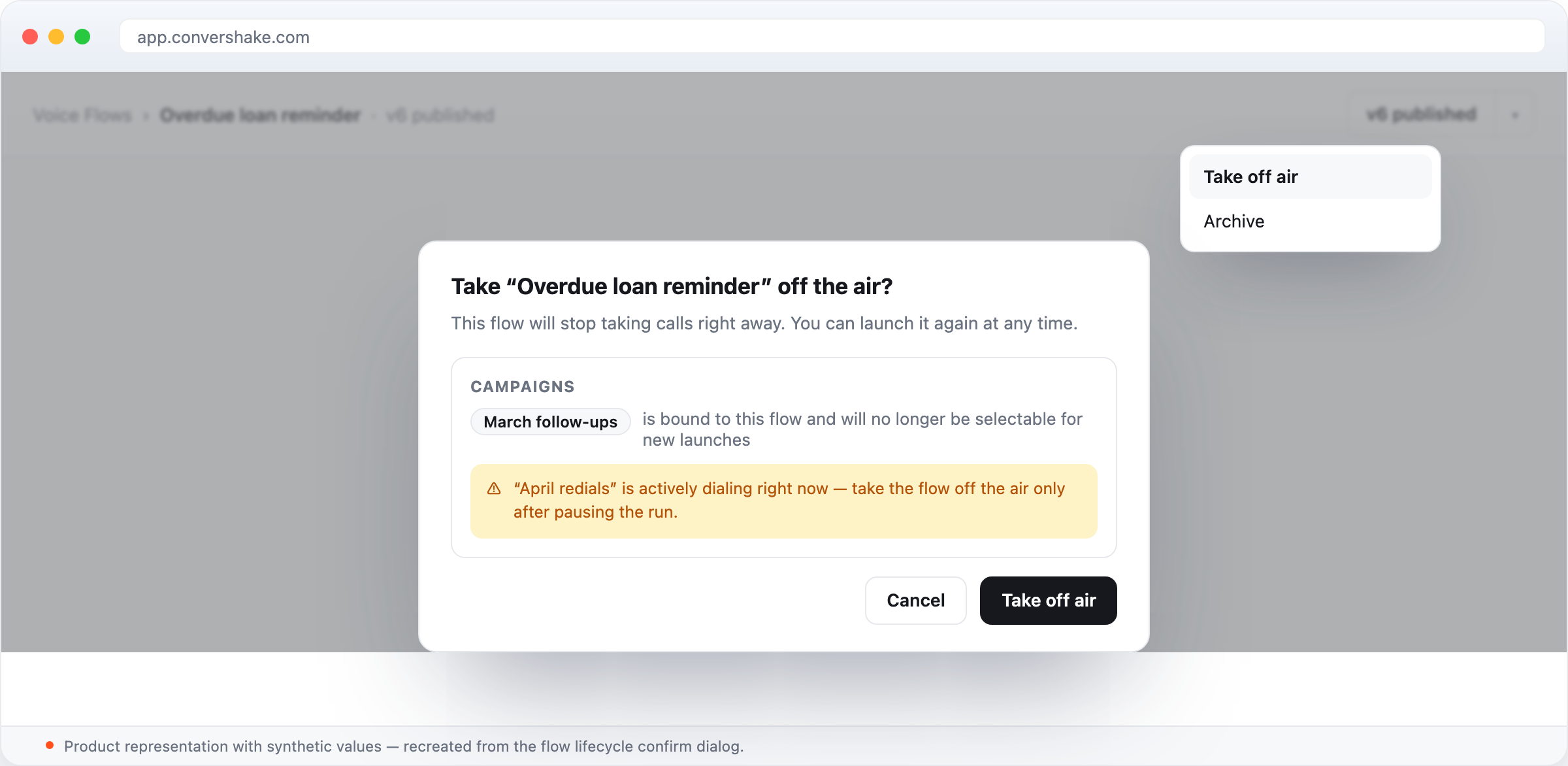
Call scripts pile up over time, and the one thing you want for an outdated one — stop it working, keep its history — should be safe, reversible, and limited to the right people.
- Before acting, the confirmation shows what the script is connected to — which campaigns use it and whether any are calling right now.
- Only people allowed to put scripts live can take them off the air — account owners by default.
- When you build a campaign, scripts are now organised in your own folders, so the right one is easy to find even with hundreds in the account.
- Past calls keep their full records — including exactly which version of the script ran them.
What shipped
- Take off air and Archive with verified takedown
- One production-deploy permission across every off-air path
- Folder-navigable campaign script picker
Everything else that shipped

Campaigns

Building call scripts

Calls and reporting

Languages
See it on your own flows
These shipped for every workspace with outbound campaigns.